
Form Connect for Bullhorn
Connect your existing WordPress forms to Bullhorn without rebuilding your site. Map fields, send candidate data, and keep everything in sync automatically.
The Problem
Your forms and Bullhorn are not talking to each other
Most recruitment websites have contact forms, application forms, or registration forms already in place. But out of the box, none of them know what Bullhorn is. Data lands in WordPress and stops there.
Without a bridge, you are either manually moving candidate data into Bullhorn, relying on CSV exports, or missing submissions entirely. All of which slow your team down and introduce the risk of lost data.
Manual Data Entry
Copying form submissions into Bullhorn by hand is slow, error-prone, and scales poorly as application volumes grow.
Lost Submissions
Without an automated connection, candidate submissions can fall through the cracks before anyone on the team has a chance to act on them.
Duplicate Records
Without intelligent matching, the same candidate can end up with multiple records in Bullhorn, making it harder to track their history and interactions.
The Solution
Form Connect bridges your forms and Bullhorn
Form Connect is an add-on for Recruitilize that maps your existing WordPress form fields directly to Bullhorn candidate and job fields. There is no need to rebuild your forms or switch to a different plugin. You keep everything you already have and add a direct, reliable connection to Bullhorn on top of it.
When a candidate submits your form, Form Connect processes the data, maps each field to the corresponding Bullhorn record, and pushes it through. If Bullhorn is unavailable at that moment, Recruitilize Cloud handles the retry automatically so nothing is lost.
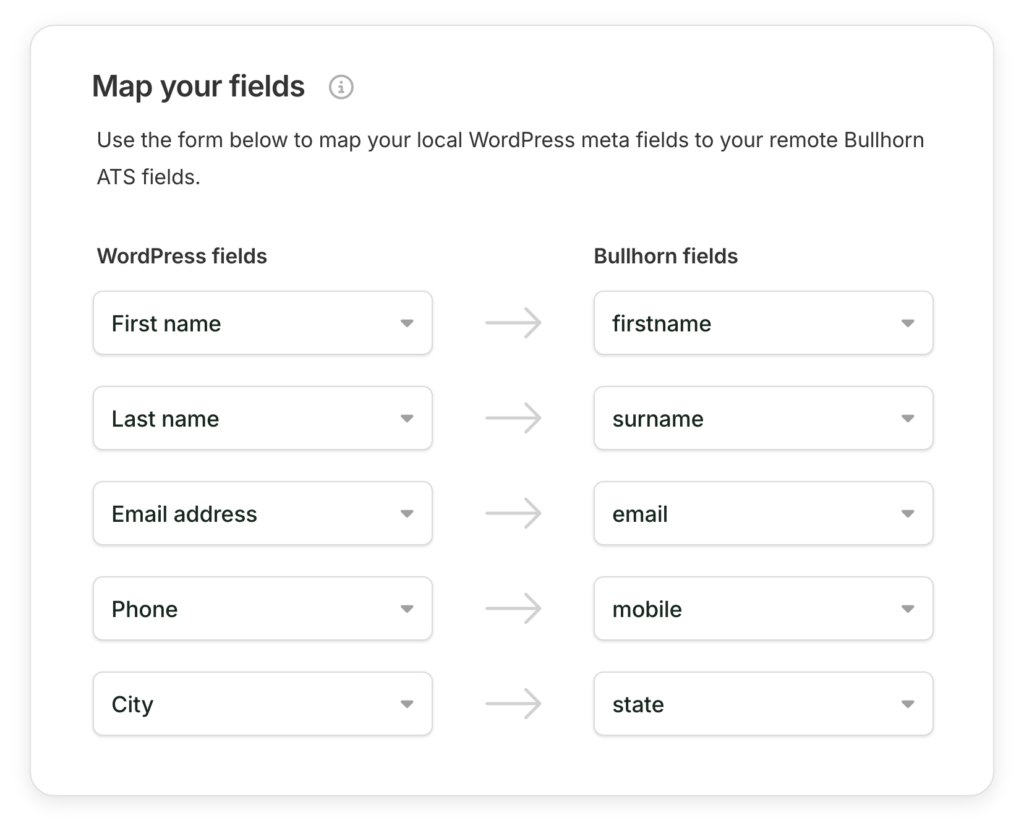
Field Mapping
Map any form field to Bullhorn in minutes
Inside the Recruitilize settings, Form Connect gives you a simple field mapping interface. Choose your form, then connect each field to its corresponding Bullhorn field. Standard fields and custom fields are both supported. You only need to configure it once per form and it handles everything from there.
Submission Handling
Every submission lands in Bullhorn automatically
When a candidate submits your form, Form Connect intercepts the data before it stops at WordPress. The record is structured, validated, and delivered to Bullhorn as a candidate entry. No manual steps, no exports, no copying and pasting. The candidate sees a normal confirmation and your team sees the record in Bullhorn exactly as expected.

Compatibility
Works with the forms you already use
Form Connect is built to slot into your existing setup rather than replace it. If you are already using one of the plugins below, you can be up and running without touching your forms at all.

Contact Form 7
Works with your existing CF7 setup out of the box, no custom code required.

Gravity Forms
Full field mapping support including file uploads for CV submissions.

WP Job Manager
Send job applications directly into Bullhorn as candidate records with full field support.
More integrations are added regularly. If your form plugin is not listed, get in touch and we will let you know if support is planned.
Ready to Connect Bullhorn to WordPress?
Form Connect is included as part of the Recruitilize plugin. Get started today and have your forms pushing data to Bullhorn within the hour.